
Related: PSX trading signals — our main page for PSX trading signals and PSX calls.
People who search for a PSX trading bot usually want help following the Pakistan Stock Exchange without watching every tick. Some want a Pakistan Stock Exchange trading bot that places orders for them. Others want an AI trading bot Pakistan traders can use to review ideas, then decide for themselves.
Those are not the same product. This guide explains the term, how a trade-setups tool differs from automated order placement, and how to read a complete setup on PSX and the KSE-100 (also written KSE 100). Not financial advice. No bot or app can promise a result.
MaxTrade is a trade-setups app, not an auto-trading bot. It does not connect to your broker and does not place orders.
What people mean by a PSX trading bot
"Bot" is a loose word. In PSX conversations it usually means one of three things:
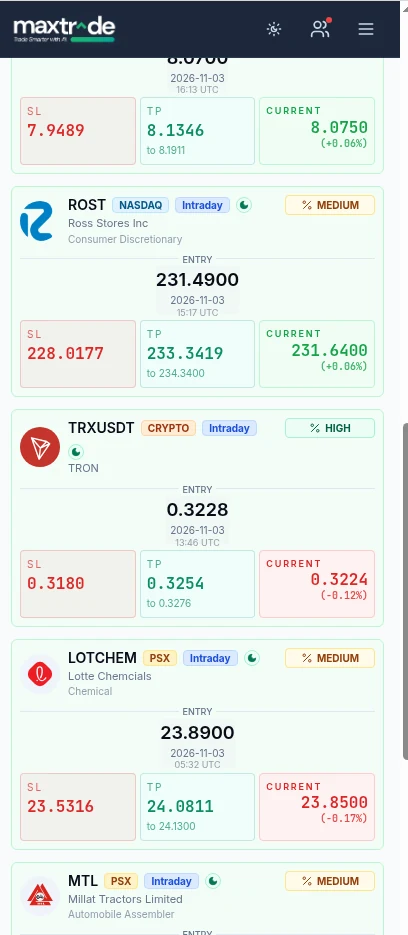
- A trade-setups tool that studies price, volume and indicators and presents a planned idea: direction, entry, stop loss and take-profit levels (TP1 and TP2). You accept, skip or adjust it, then place any order through your own broker.
- An auto-trading or execution robot linked to a brokerage account, often through API keys, that sends orders when its rules fire. This is what many people imagine when they say automated PSX trading.
- A custom script that pulls PSX data, tests rules and, if the author chooses, routes orders. That is closer to algo trading than to a ready-made app.
A PSX trading robot in advertising may blur these three. Before you sign up, ask whether the tool only shows you a plan or can trade your account without you. If you cannot tell, do not connect an account.
MaxTrade sits in the first group. It is an AI trade-setups app for PSX and nine other markets: NASDAQ, NYSE, LSE, NSE India, Tadawul, ADX, DFM, QSE, and crypto via Binance.
PSX algo trading versus automated order placement
Algo (algorithmic) trading means rules are written down in advance. "Algo" does not automatically mean the software will fire live orders.
Automated PSX trading usually means those rules can also send orders. That can reduce hesitation, but it also reduces your chance to pause for news, a halt, or a wide spread. Any bot that trades for you needs some form of account access.
A trade-setups app stops one step earlier. It can use rules or an AI model to propose a plan, then leaves the order with you. That slowness is often useful. PSX has its own session hours, circuit breakers and stock-specific liquidity, and a KSE 100 name can trade very differently from a thinner listing.
If you are choosing an AI trading bot Pakistan investors can use day to day, write down which type you want. Do not connect a broker account to a product you only meant to use as a research aid.
How a trade-setups tool differs from an auto-trading bot
- Who decides. With a setups tool, you do. You can skip a card, cut size, or stand aside. With an execution bot, the software keeps going until you stop it or a risk limit is hit.
- Account access. A setups app should not need your broker login or trading-enabled API keys. MaxTrade does not connect to your brokerage account. An execution bot typically does.
- What you can verify. A serious setups tool should show losses as well as wins — targets reached, stopped out, exited early, or unconfirmed. Be cautious of any bot that only advertises successful examples. Past results do not tell you what will happen next.
Neither model is "safe". Both can lose money. For a fuller comparison, see setups tools versus auto-trading bots. For PSX context, start with the PSX trade-setups pillar and the practical KSE-100 guide.
What a complete PSX trade setup should include
A useful PSX trading bot or setups app should give you a plan you can size, not a one-word "buy":
- Direction: buy, sell or hold. Hold means the tool does not see a clear plan right now.
- Entry: the area where the idea becomes valid. If price has already moved a long way, chasing it is optional.
- Stop loss: the level at which the idea is considered wrong. Use this number to size the position.
- TP1 and TP2: two take-profit levels, so you can plan a partial exit and a further target in advance.
- A risk tag or holding style (intraday versus a short multi-day swing).
- A history you can inspect, including losing and incomplete outcomes.
MaxTrade presents PSX cards in that format, with a low, medium or high risk tag, and a dashboard that records how earlier setups resolved.
How this applies to KSE-100 and the wider Pakistan stock market
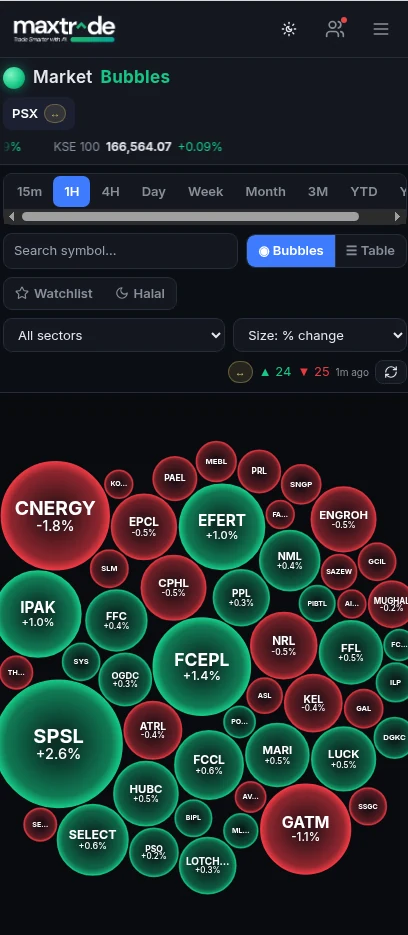
The KSE-100 (KSE 100) is the benchmark most people mean when they talk about "the market" in Pakistan. Use it as backdrop, not as a green light. If you are reviewing a name in the index, ask whether the idea agrees with or fights the broader trend that day. Index strength does not make every constituent a good trade: liquidity, spreads and stock-specific news still come first. Session times, auctions and halts matter too. A setup that assumes you can exit instantly is weaker in a thinly traded name.
A Pakistan Stock Exchange trading bot that only scans the index, or only looks at a chart in isolation, is leaving context out. Know whether you are trading a liquid KSE-100 stock or a thinner listing, and whether you can manage the order during Pakistan market hours. Keep position size tied to the stop on that symbol.
A simple way to review a setup before you place an order
- Read the whole card. Direction, entry, stop loss, TP1, TP2, risk tag and holding style. If any of those are missing, pause.
- Compare price with the entry. If price has already moved through the entry toward the first target, skipping or waiting is a valid choice.
- Size from the stop. Decide how much of your capital you are willing to lose if the stop is hit, then work out quantity from the distance between entry and stop. If the size feels large, reduce it or stand aside. Do not widen the stop to make a larger order "fit".
- Check the stock, not only the card. Spread, recent volume, upcoming results, and whether the symbol is in the KSE-100. Confirm the price with your broker. Data can be delayed or wrong.
- Place the exit orders with the entry and record the outcome honestly — hit, stopped, or exited early.
For a deeper walkthrough, see how to read a trade setup. To see how PSX cards look in the app, visit the PSX trade-setups page or the app overview.
Common mistakes when using a PSX trading bot
- Treating a card as an instruction. It is a structured idea. You can reject it.
- Assuming automation would have been better. An execution bot can also enter a poor trade.
- Moving the stop further away after entry, which turns a planned risk into an unplanned one.
- Oversizing because a tag looks confident. Size should come from the stop distance and your account.
- Following every market at once. A focused PSX watchlist is easier to review than a mixed stream.
- Forgetting commission, spread and thin liquidity, which can change the real result versus the levels on a card.
AI tools make it easier to act often. Acting often is not the same as trading well.
For practical PSX trading tips on reading a setup — and for the difference between a forecast and a trade setup — see the newer Pakistan stocks guides. If you are weighing a buy idea, start with how to judge a buy setup rather than a list of names.
Choosing where to read these setups? See how to choose a PSX trading app, which compares broker apps, analysis apps and trade-setups apps for the Pakistan stock market.
Curious how rules-based automation works on the Pakistan Stock Exchange? Read PSX algo trading explained, covering algorithmic rules, levels of automation and why a trade-setups feed is not an execution API.
Frequently asked questions
Is MaxTrade a PSX trading bot?
It depends what you mean by bot. MaxTrade is an AI trade-setups app for the Pakistan Stock Exchange and nine other markets. It does not connect to your broker or place orders. You review each setup and decide whether to act.
What is the difference between a PSX trading robot and a trade-setups app?
In casual use, "robot" often implies automated PSX trading — software that sends orders. A trade-setups app only presents a plan (direction, entry, stop, targets). If a product needs trading access to your account, treat it as an execution tool.
Can an AI trading bot Pakistan traders use guarantee results?
No. AI models can be wrong, and markets change. No app, bot or setup can guarantee accuracy or a gain. You can lose some or all of the capital you trade. Not financial advice.
Does this work only for the KSE-100?
No. KSE-100 names are a common starting point, but a setups app can cover a wider PSX universe. Liquidity still varies stock by stock. Prefer names you can enter and exit with a clear price, and confirm levels with your broker.
Do I need to know algo trading to use a setups app?
No. You should still understand the plan on the card and how you will size and exit the trade. You do not need to write code.


