
Crypto signals are everywhere: Telegram channels, X threads, Discord groups and apps all promise the next big move. The problem is rarely a shortage of signals. It is knowing which ones are worth acting on and what to do once you are in a trade. This guide explains what a good crypto trading signal contains, how to filter signals for crypto so you only take setups that fit your plan, and how to turn each one into an order with a defined risk. It uses the format of the MaxTrade app as a reference, but the process works with any structured signal source.
What are crypto signals?
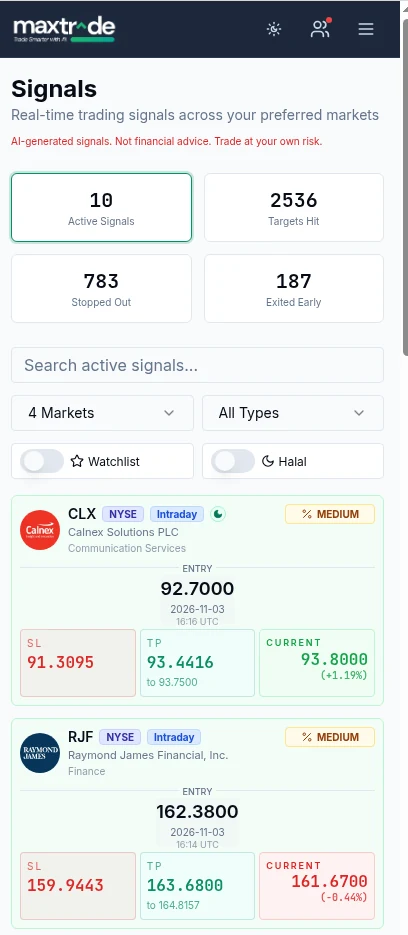
A crypto signal is a trade idea for a specific coin pair, such as BTCUSDT or SOLUSDT, delivered with the price levels needed to act on it. A weak signal says little more than "buy ETH now". A strong one tells you the entry price, the stop loss where the idea is wrong, one or more take-profit targets, the expected holding style and how confident the analysis is. Signals can come from human analysts, rule-based scanners or AI models. MaxTrade uses AI analysis of market data and publishes every crypto signal with an entry, an SL (stop loss) and a TP (take profit), plus a probability rating of Medium or High and a type of Intraday or Mini Swing.
What a complete crypto trading signal should include
Before you trust any source of crypto trading signals, check that every call includes these parts. The pair and direction, so there is no doubt about what to trade. An entry price or zone, so you know when the setup is valid. A stop loss, so the maximum loss is decided before you enter. A take-profit target, so you know where the plan ends. A holding style, because an Intraday setup and a multi-day setup need different attention. And some measure of conviction, such as a probability label. If a signal is missing the stop loss, treat it as an opinion rather than a plan.
Step 1: Pick the signals that fit your style
Not every signal is meant for you. If you can only check your phone in the morning and evening, Intraday crypto signals that play out within hours may not suit you, while Mini Swing setups that develop over a few days might. In the MaxTrade app you can filter the signals feed by market and type, and the Halal filter lets you hide assets that do not meet Shariah screening if that matters to you. Start with one or two styles you can actually manage and ignore the rest. Taking fewer, better-matched trades is one of the simplest ways to trade smarter.
Step 2: Check the entry is still valid
Crypto moves fast. By the time you open a signal, price may already be well past the entry. If you buy far above a long entry, your stop is now further away and your target is closer, which quietly ruins the risk-reward. A practical rule: if price has moved more than a small fraction of the distance between entry and TP, skip the trade or wait for a pullback with a limit order at the entry. Missing a trade costs nothing; chasing one often costs a lot.
Step 3: Size the position from the stop loss
Position size is where most beginners go wrong with trading with crypto. Decide how much of your account you are willing to lose if the stop is hit, commonly 0.5% to 1% for a small account. Then divide that amount by the distance from entry to stop. Example with illustrative numbers only: account of $2,000, risk 1% = $20. A long signal on a coin with entry $50.00 and SL $48.00 has $2.00 of risk per coin, so the position is 10 coins ($500 of exposure). If the stop is hit you lose about $20 plus fees, not a random amount. Avoid leverage until this habit is automatic.
Step 4: Place the stop and target immediately
Enter the order, then set the stop loss and take-profit orders right away on your exchange, using OCO (one-cancels-the-other) orders where supported. Do not plan to "watch it". Crypto trades around the clock, and a sharp wick at 3 a.m. will not wait for you to wake up. Having the SL and TP on the exchange turns the signal into a complete plan that runs whether or not you are looking at the screen. MaxTrade does not place trades for you, so this step is always in your hands.
Step 5: Manage the trade without overriding the plan
Once a trade is live, the main job is to leave it alone. Moving the stop further away to avoid a loss defeats its purpose. Some traders move the stop to the entry price after price travels a good part of the way to TP, which reduces risk on the remaining position; decide whether you will do this before entering. If market conditions change sharply, for example a major exchange outage or surprise news, exiting early is a legitimate choice. The MaxTrade app records outcomes as targets hit, stopped out or exited early for exactly this reason: real trading has all three.
Use the watchlist and Market Bubbles for context
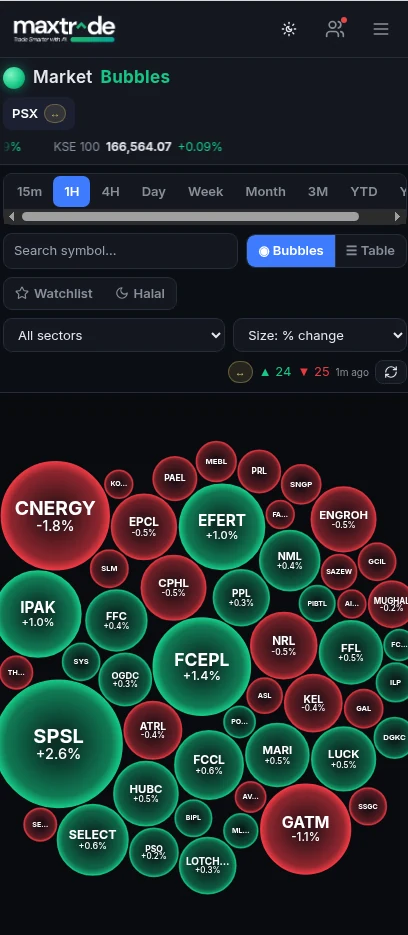
A signal is more useful when you understand what the wider market is doing. Add the coins you trade to the MaxTrade watchlist so their signals are easy to find. Market Bubbles shows a visual heatmap of assets sized and colored by percentage change, which helps you see at a glance whether the market is broadly risk-on or under pressure. If almost everything is deep red, you may choose to reduce size on new long signals, even if each setup looks fine on its own.
Review results honestly
Smarter trading means measuring, not guessing. At the time of writing, the MaxTrade app shows 2,536 targets hit, 783 stopped out and 187 exited early across its signal history. Those counts are past results and do not guarantee future performance, but they show why stop losses matter: losses happen, and the plan has to survive them. Use the Analytics screen to filter by market, signal type and time period, and keep your own simple journal of which signals you took, why, and how you managed them.
Common mistakes with signals for crypto
Taking every signal you see, which spreads attention and capital too thin. Entering late and far from the entry level. Skipping the stop loss because "this coin always bounces". Using high leverage on a setup sized for spot. Following several channels at once and getting conflicting calls on the same coin. Judging a signal source on one or two trades instead of a meaningful sample. Avoiding these is often worth more than finding a better signal.
Frequently asked questions
What are crypto signals?
Crypto signals are trade ideas for specific coin pairs that include an entry price, a stop loss and a take-profit target, so you can plan the whole trade before you enter it.
Are crypto trading signals profitable?
Some trades hit their targets and some hit their stop losses. No signal service can guarantee profit. Results depend on the signals, your position sizing and whether you follow the plan.
How many crypto signals should I take?
Only as many as you can manage with proper position sizing. Many traders do better taking a few signals that fit their style than taking every call.
Does MaxTrade trade crypto for me?
No. MaxTrade is a signals app. It shows entry, SL, TP, probability and type on each signal, and you decide whether to place the trade on your own exchange.
What is the difference between Intraday and Mini Swing signals?
Intraday signals are designed to play out within the trading day, while Mini Swing signals are meant to develop over a few days and need less constant attention.


