
Search for a crypto trading bot for Binance and most results promise a robot that connects to your exchange account and trades around the clock. That is one kind of tool. Another kind does the analysis, publishes a complete trade setup, and leaves the order to you.
This guide explains the difference, what you hand over when you connect a bot through exchange API keys, and how to judge any Binance trading bot app before you trust it with money. Not financial advice. Crypto moves quickly, and every approach carries the risk of loss.
MaxTrade is a trade-setups app, not an execution bot. It never asks for or holds your Binance API keys, and it covers NASDAQ, NYSE, LSE, NSE India, PSX, Tadawul, ADX, DFM, QSE, and crypto via Binance.
What people mean by a crypto trading bot for Binance
The phrase covers a wide range of products. Some are grid or DCA tools that buy and sell inside a price band. Some copy another account. Some run a strategy you configure, and some claim to use AI to pick entries. A few never touch your account at all and simply tell you what they see.
What they share is a promise to save time. Crypto trades every hour of every day, and nobody can watch a chart that long. That is a fair problem to solve. The real question is how much control you give up to solve it, and what happens on the day the market does something the bot was not built for.
Before comparing features, decide which problem you want help with: finding ideas, managing open positions, or pressing the buttons. A crypto trading bot can help with any of the three, but the risk changes a lot depending on which one you hand over.
Two kinds of Binance trading bot
Execution bots connect to your Binance account through API keys and place, change, or cancel orders for you. Once switched on, they act without asking. Your job is mostly to configure settings and watch the balance.
Setups bots analyse the market and publish a trade setup: the pair, direction, entry area, stop, and targets. They do not connect to your exchange. You read the plan, decide whether it fits your rules, and place any order yourself. The longer comparison is in our post on a setups bot vs an auto-trading bot.
Neither type is automatically good or bad. An execution bot can enforce a rule you would otherwise break. A setups bot keeps judgment in your hands, which is slower but easier to audit. What matters is that you know which one you are signing up for, because marketing pages often blur the line.
What exchange API keys actually expose
To trade for you, an execution bot needs an API key and secret from your exchange account. Binance lets you choose permissions for each key, such as reading balances, spot trading, and futures trading. Withdrawals are a separate permission, and a trading bot should never need it.
Even without withdrawal rights, a trading key is powerful. Whoever holds it can open and close positions, switch between pairs, and in some setups trade with leverage. If the bot company is breached, or a fake bot collects keys on purpose, losses can happen through trades alone.
If you do use an execution bot, keep the basics in place:
- Create a separate key for each tool, so you can revoke one without touching the others.
- Leave withdrawals switched off, and restrict the key to trusted IP addresses where the exchange supports it.
- Fund the account with only the amount you are prepared to lose to a bug or a bad run.
- Review open orders and the trade history yourself, not just the bot's own dashboard.
A setups app removes this layer completely. With no key to store, there is nothing on that side to leak.
Where auto-trading bots tend to break
Bots follow rules, and markets change regimes. A grid that works in a sideways range can keep buying all the way down in a sharp sell-off. A trend strategy can be stopped out again and again when price chops. Few retail bots explain, in plain words, what they do when conditions stop matching their design.
Other weak points are less obvious. Slippage and fees on frequent small trades add up. Exchange outages and API rate limits can leave orders half-filled. Backtests shown on a sales page are often tuned to the past, and may never be repeated live.
None of this means automation is useless. It means the burden of checking moves from each trade to the system as a whole, and that is harder for most people to do well. Ask any bot vendor for a record that includes losing periods, not only highlights. No tool can promise returns, and a vendor that does is a warning sign.
What a trade setup gives you instead
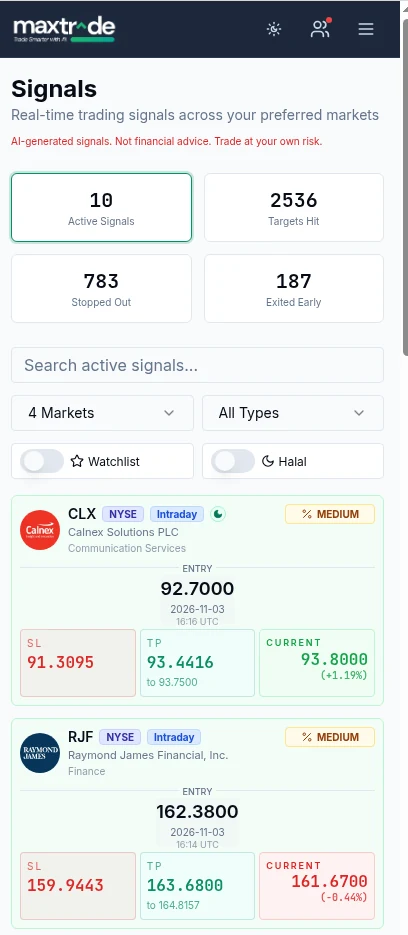
A complete trade setup is a plan you can read before you act. It names the pair, the direction, an entry area, a stop where the idea is no longer valid, and at least two targets, often called TP1 and TP2. It also has a timestamp and a status you can check later: open, target reached, or stopped out.
With that plan you can size the position from the stop distance, so the amount at risk stays inside your own limit. You can skip a setup that clashes with your other trades. You can place a stop order and a limit order at your target on Binance yourself, and you remain the only person who can touch your account.
Because every setup is recorded with its outcome, you can review the losers as well as the winners and decide over time whether the approach suits you. If you are comparing apps rather than single cards, our guide to choosing a crypto trade-setups app covers what a fair record looks like.
Checklist before you pick a Binance trading bot app
- Does it place orders? If yes, it needs API keys. If no, it should never ask for them.
- Which permissions does it request? Trading only, never withdrawals.
- Is the full record visible? Look for losing trades and drawdowns, not a screenshot of the best week.
- Is every plan complete? Entry, stop, and targets on each idea, so you know where it is wrong.
- Can you switch it off at once? Revoking a key or ignoring a setup should be one step.
- Who is behind it? A real company, a support channel, and clear terms beat an anonymous chat group.
- Does it make guarantees? Any promise of fixed returns is a reason to walk away.
Working through the list takes ten minutes and can save you from the most common mistakes people make with a new crypto trading bot.
Where MaxTrade fits
MaxTrade sits on the setups side. Its AI scans markets and publishes trade setups with entry, stop loss, TP1, and TP2, each with a status you can revisit. It does not connect to Binance, does not hold API keys, and does not place orders. You stay in control of every decision.
The same card format covers crypto via Binance pairs and stocks on NASDAQ, NYSE, LSE, NSE India, PSX, Tadawul, ADX, DFM, and QSE, so one routine works across markets. See how MaxTrade works, or browse the crypto trade setups page for the current pairs.
Whatever tool you choose, size every position so a stop-out is affordable, and keep a written log of what you did and why. Not financial advice.
If you trade Bitcoin or Ethereum by hand instead, read Bitcoin trade setups: how to read BTC and ETH ideas on Binance, which covers 24/7 sessions, funding and why every setup needs a stop.
Not sure how much of your routine to hand to a bot? Read automated crypto trading: what can be automated and what should stay manual, which splits alerts, exit orders and full bots by risk.
Frequently asked questions
Is there a crypto trading bot for Binance that does not need my API keys?
Yes, if it only publishes trade setups. A tool that places orders on Binance needs API keys; a setups app like MaxTrade does not connect to your account and never asks for keys.
Is a Binance trading bot safe to use?
It depends on the tool and the key permissions. Never enable withdrawals, use a separate key per tool, restrict IP addresses where possible, and fund only what you can afford to lose. No bot removes market risk.
What is the difference between a trading bot and a trade setup?
A trading bot that executes places orders for you. A trade setup is a plan with pair, direction, entry, stop and targets that you review and act on yourself.
Can a crypto trading bot guarantee returns?
No. Markets change and every strategy has losing periods. Treat any promise of guaranteed or fixed returns as a warning sign.
Does MaxTrade trade on Binance for me?
No. MaxTrade is a trade-setups app. It shows entry, stop loss, TP1 and TP2 for crypto via Binance and nine stock markets, and you place any order yourself. Not financial advice.
