
A trade-setups app for crypto is a tool that publishes trade ideas for digital-asset pairs, usually with a plan attached. Many people who have already seen a buy alert in a group chat — a coin, a direction, and little else — want something more complete to review.
This guide is about what to look for beyond that alert: a full trade setup, a record that includes losses, and a clear line between a setups app and a bot that places orders. Not financial advice. Crypto can move quickly, and every approach carries the risk of loss.
MaxTrade is a trade-setups app, not a broker and not an order-placing robot. It covers NASDAQ, NYSE, LSE, NSE India, PSX, Tadawul, ADX, DFM, QSE, and crypto via Binance.
What a crypto trading signals app should actually show
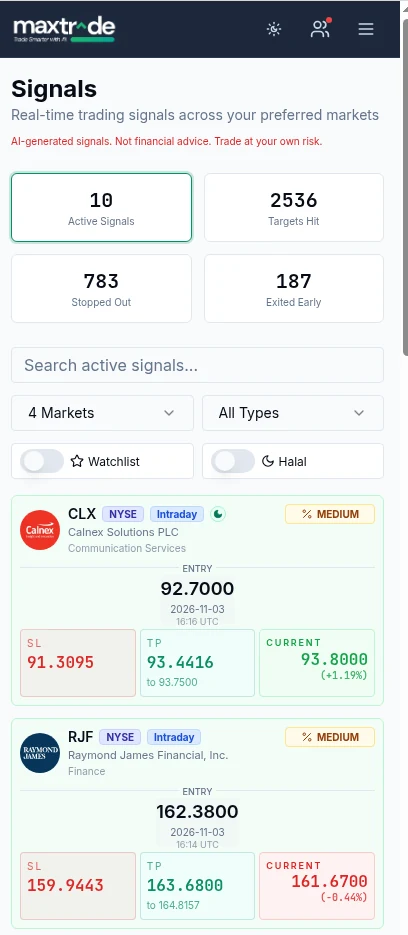
A useful app does not stop at “buy this coin.” It should present a trade setup you can review before you act: the pair, the direction, an entry area, a stop, and at least two targets (TP1 and TP2). The holding window also matters, because a setup meant to resolve in hours is not the same as one meant to develop over several days.
You should also be able to see when the idea was published and whether it is still open, already reached a target, or already stopped out. Without that status, you are looking at a highlight, not a record you can inspect later.
Why a buy alert is not a trade setup
A buy alert is usually a ticker and a price, sometimes with a short comment. It does not tell you where the idea is wrong, how large a position is reasonable, or when to take partial size off. If the market runs through the mentioned price, you have no invalidation level to use.
A trade setup is a plan. The entry is the area you are willing to work; the stop is where the plan is no longer valid; TP1 and TP2 are the levels you will scale or exit if the move develops. That structure does not make the idea correct. It makes the idea testable, and it gives you a way to size the position from the distance to the stop rather than from a hunch.
Entry, stop, TP1 and TP2 on crypto pairs
Crypto via Binance trades around the clock, so a setup can be published while you are asleep and already be stale when you open the app. The first check is whether the current price is still near the entry area. If it has already run to TP1, you are not looking at the same trade that was published.
The stop deserves as much attention as the entry. On fast pairs, a tight stop can be taken out by ordinary noise; a wide stop means a smaller position if you want to keep the cash risk the same. Targets should be written down before you enter. Moving them after the fact turns a plan into a guess.
For a step-by-step walkthrough of those four fields, see how to use crypto trade setups. The market pillar is the crypto trade setups page. How to read a trade setup covers entry, stop, TP1 and TP2 in general terms.
A public loss record matters more than a highlight reel
Any feed can show its best outcomes. What you need is a record that also shows stopped-out and early-exit cases, with dates you can check. If an app only forwards winners, you cannot judge how often the plan fails, or how large those failures are relative to the targets.
A loss record is not a promise about the next trade. It is a way to see whether the publisher is showing the same rules on quiet days and on busy days. If the history is missing, editable without a trace, or limited to screenshots, treat the feed as marketing, not as a log.
Why Telegram groups are a weak substitute
Telegram is still where a lot of crypto ideas circulate. The format works against a complete plan. Messages can be edited or deleted. There is often no durable archive of losers. Alerts can arrive late, stacked in a busy chat, or mixed with conversation that has nothing to do with the setup.
A dedicated app should keep each idea as a card you can reopen later, with its status updated in one place. That is a more reliable habit than scrolling a group and hoping you did not miss the stop.
AI crypto trading signals: how to judge an AI crypto signals app
Searches that combine AI with crypto trade setups usually mean the same thing: a tool that uses a model, rules, or both to publish ideas, rather than a person typing alerts by hand.
“AI” is not a quality stamp. What matters is whether you can see the same fields — entry, stop, TP1, TP2 — and a history that includes losses. Ask how the idea is produced only after you can inspect the plan. A model that cannot show invalidation is still just a buy alert, only with a more modern label.
Also ask whether the app needs exchange API keys. If it does, you are no longer looking at a setups tool; you are looking at something that can touch your account. MaxTrade does not place orders and does not need your exchange keys. You review the setup and, if you choose to act, you place the order yourself.
Crypto via Binance: volatility and invalidation
Crypto does not close for the weekend the way a stock exchange does, but it still has quieter and busier hours, often around the overlap of US and European stock sessions, and around major data releases. Liquidity thins out at other times, and spreads can widen.
That is why invalidation matters. If price has already left the entry area, or if the market has made a sharp move on news, the published plan may no longer apply. Skipping a stale setup is part of using an app well. Nothing in a feed is an instruction to trade.
Where MaxTrade fits
MaxTrade publishes trade setups for crypto via Binance, alongside NASDAQ, NYSE, LSE, NSE India, PSX, Tadawul, ADX, DFM and QSE. Each card is built to be reviewed: entry, stop loss, TP1 and TP2. How it works explains the product. For a beginner risk plan, see crypto trading for beginners. For the difference between a setups tool and an auto-trading bot, see setups bot versus auto-trading bot.
You stay in control of every decision. Not financial advice.
If an app markets itself as AI, read AI crypto trading app: how to judge an AI trade-setups tool, which covers what the AI should show you and how to check its history yourself.
Frequently asked questions
What is a crypto trading signals app?
It is a tool that publishes trade setups for digital-asset pairs — typically the pair, direction, entry, stop and targets — for you to review. It is not the same as an exchange, and it is not necessarily a bot that places orders.
What should every crypto trade setup include?
The pair, the direction, an entry area, a stop where the plan is no longer valid, and at least one target, preferably TP1 and TP2. A timestamp and a later status (open, target reached, stopped out) help you read the record honestly.
Are AI crypto trading signals the same as a bot that places orders?
Not automatically. A model can publish trade setups for you to review, or it can be wired to place orders through exchange API keys. Ask which of those you are being offered, and do not share keys with a setups tool.
Why isn't a Telegram group enough?
Messages can be edited or deleted, losers are easy to hide, and alerts can arrive late in a busy chat. A dedicated app should keep each trade setup as a card with a status you can reopen later.
Does MaxTrade place crypto trades for me?
No. MaxTrade is a trade-setups app. It shows entry, stop loss, TP1 and TP2 for you to review, and you place any order yourself on your own exchange. Not financial advice.

